
Get your move-in checklist signed.
Upload your move-in checklist or house inventory form, add everyone who needs to sign, and get the completed copy. No accounts needed for signers.
The document is stored so your recipients can open it, reachable only by private link, and you can delete it any time.
5 free signature requests per month. Free account required to send.
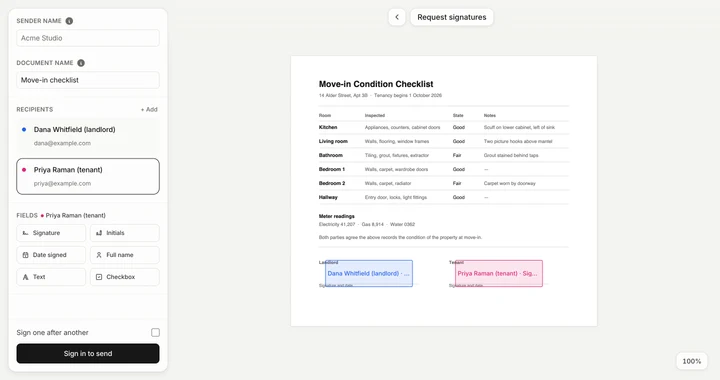
How it works
- 1
Upload your checklist
Drop in the move-in checklist, inventory form, or condition report.
- 2
Add signers
Enter a name and email for everyone who signs, then place a signature field for each of them.
- 3
Download the signed copy
Each signer gets a private link, and you get the completed checklist with its Certificate of Completion.
Related tools
- Request SignaturesSend a PDF for others to sign online — track who’s signed.
- Lease agreement signingGet lease renewals and rental agreements signed by multiple parties.
- Property authorization signingGet property authorization letters and cartas de autorización signed by multiple parties.
- Fill PDFType into a PDF form and sign it.
Questions
Where do I start?
Head to www.penstead.com/home-inventory-signature, drop your checklist in the box, add each signer's name and email, and place a signature field for everyone. You get the signed copy with an audit trail when everyone's done.
What file types can I upload?
PDF, Word documents, and images — most house inventory forms and move-in checklists are one of the three. A photo or scan converts on upload and can be OCR’d.
Is it free, and do I need an account?
A free account gets 5 signature requests a month. Sending needs that account; the people signing need nothing. Pro is $15 a month for 50 requests.
Where is the checklist stored?
Everything before you send runs in your browser. After you send, the document is stored so signers can open their links, behind an unguessable URL that is not listed or searchable. Signing links stop working after 30 days; the completed document is kept until you delete it.